OCEB2F 05 Business Process Modeling Concepts
Jump to navigation
Jump to search
Module 5. Business Process Modeling Concepts⌘
Business Process Model and Notation (BPMN)⌘

- The primary goal of BPMN is to provide a notation that is readily understandable by all business users, from the business analysts to the technical developers, and finally to the business people.
- BPMN is a standardized business process modelling bridge for the gap between the business process design and process implementation.
- A vision of BPMN is that it can visually model business activities that become machine executable
- BPMN 2.0 specification - http://www.omg.org/spec/BPMN/2.0/
Business Process⌘

BPMN 2.0 Spec:
A Process describes a sequence or flow of Activities
in an organization with the objective of carrying out work.
Process Logic⌘
by Bruce Silver

- Process Logic (Process Model) is a complete map of all the paths from the triggering event to any defined end state.
- Process Model is more than documentation of one instance of the process.
- Process logic is usually hidden.
BPMN 2.0 XML⌘
- BPMN 2.0 file is an executable XML representation of a business process

<?xml version="1.0" encoding="UTF-8"?>
<definitions id="Definition" ... >

  <process processType="Private" isExecutable="true" id="com.sample.bpmn.hello"
     name="Hello World" >

    <!-- nodes -->
    <scriptTask id="_2" name="Hello" >
      <script>System.out.println("Hello World");</script>
    </scriptTask>
    <startEvent id="_1" />
    <endEvent id="_3" >
        <terminateEventDefinition/>
    </endEvent>

    <!-- connections -->
    <sequenceFlow id="_1-_2" sourceRef="_1" targetRef="_2" />
    <sequenceFlow id="_2-_3" sourceRef="_2" targetRef="_3" />

  </process>
BPMN 2.0 XML⌘
  <bpmndi:BPMNDiagram>
    <bpmndi:BPMNPlane bpmnElement="com.sample.bpmn.hello" >
      <bpmndi:BPMNShape bpmnElement="_2" >
        <dc:Bounds x="96" y="16" width="80" height="48" />
      </bpmndi:BPMNShape>
      <bpmndi:BPMNShape bpmnElement="_1" >
        <dc:Bounds x="30" y="22" width="36" height="36" />
      </bpmndi:BPMNShape>
      <bpmndi:BPMNShape bpmnElement="_3" >
        <dc:Bounds x="210" y="22" width="36" height="36" />
      </bpmndi:BPMNShape>
      <bpmndi:BPMNEdge bpmnElement="_1-_2" >
        <di:waypoint x="66" y="40" />
        <di:waypoint x="96" y="40" />
      </bpmndi:BPMNEdge>
      <bpmndi:BPMNEdge bpmnElement="_2-_3" >
        <di:waypoint x="176" y="40" />
        <di:waypoint x="210" y="40" />
      </bpmndi:BPMNEdge>
    </bpmndi:BPMNPlane>
  </bpmndi:BPMNDiagram>

</definitions>
BPMN Basics⌘

BPMN Activity Basics⌘
- Activity denotes work that is performed within a business process
- Activity can be:
- Task - the finest level of the process step. Cannot be broken down to a finer level.
- Subprocess - compound activity (flow of other activities)
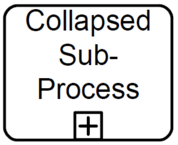 Collapsed
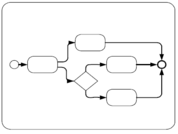 Expanded


Sub-process Rules⌘
- Pools or Lanes can't be used inside a sub-process
- A Sub-process can have only None Start Events
Error creating thumbnail: File missing
- A sequence flow can't cross a sub-process boundary
Sequence Flow⌘

A Sequence Flow is used to show the order that Activities will be performed in a Process.
Token ⌘
- Token traverses the Sequence Flows and passes through the elements in the Process
- A token is a theoretical concept that is used as an aid to define the behavior of a Process that is being performed
- The behavior of Process elements can be defined by describing how they interact with a token as it “traverses” the structure of the Process.
- A token does NOT traverse a Message Flow
Sequence Flow Splitting⌘

- Conditional flow - sequence flow with a condition that is evaluated to determine whether or not the sequence flow will be used
- Default flow - (with slash marker) used only if all the other outgoing conditional flows are not true
Gateways⌘
|
|
|
Gateways are used to control splitting and merging of sequence flows.
|

Exclusive⌘


XOR Gateway
- A diverging Exclusive Gateway (Decision) is used to create alternative paths within a Process flow
- Only one of the paths can be taken, this means the gateway is exclusive
- A Decision can be thought of as a question that is asked at a particular point in the Process
- The question has a defined set of alternative answers
- Each answer is associated with a condition Expression that is associated with a Gateway’s outgoing Sequence Flows
Exclusive Gateway Example⌘

Merging (exclusive)⌘

Parallel Gateway ⌘

AND Gateway
- A Parallel Gateway is used to create or synchronize (combine) parallel flows
- A Parallel Gateway creates parallel paths without checking any conditions; each outgoing Sequence Flow receives a token upon execution of this Gateway
- For incoming flows, the Parallel Gateway will wait for all incoming flows before triggering the flow through its outgoing Sequence Flows
Parallel Gateway Example 1⌘

Parallel Gateway Example 2⌘
Error creating thumbnail: File missing
Quiz, what will happen?⌘

Inclusive Gateway ⌘

OR Gateway
- A diverging Inclusive Gateway (Inclusive Decision) can be used to create alternative but also parallel paths within a Process flow
- Unlike the Exclusive Gateway, all condition Expressions are evaluated
- The true evaluation of one condition Expression does not exclude the evaluation of other condition Expressions
- All Sequence Flows with a true evaluation will be traversed by a token
- Since each path is considered to be independent, all combinations of the paths MAY be taken, from zero to all
- However, it should be designed so that at least one path is taken.
Inclusive Gateway Example 1⌘

Inclusive Gateway Example 2⌘

Event Basics⌘

An Event is something that “happens” during the course of a Process.
- Events affect the flow of the Process and usually have a cause or an impact. The term “event” is general enough to cover many things in a Process.
- The start of an Activity, the end of an Activity, the change of state of a document, a Message that arrives, etc., all could be considered Events
Types of events⌘
- Start Events - indicate where a particular Process will start (generates a token)
- Intermediate Events - indicate where something happens (an Event) somewhere between the start and end of a Process
- Boundary Intermediate Events - attached to the boundary of an Activity
- End Events - indicate where a Process will end (consumes a token - marks the end of a path)
Start and End⌘
- A Start Event is OPTIONAL
- a Process level — a top-level Process or an expanded Sub-Process — MAY have a Start Event:
- If a Process is complex or the starting conditions are not obvious, then it is RECOMMENDED that a Start Event be used
- If there is an End Event, then there MUST be at least one Start Event.
- If there is a Start Event, then there MUST be at least one End Event.
- End events cannot (by definition) accept outgoing sequence flow.
Processes without start or end event⌘
Error creating thumbnail: File missing
- If the Start Event is used, then there MUST NOT be other flow elements that do not have incoming Sequence Flow — all other Flow Objects MUST be a target of at least one Sequence Flow
- If the Start Event is not used, then all Flow Objects that do not have an incoming Sequence Flow (i.e., are not a target of a Sequence Flow) SHALL be instantiated when the Process is instantiated.
- If there is no End Event: every flow object without any outgoing flow means the end of the path
None Events⌘

- None Event does not have a defined trigger or result.
- The Event MUST be displayed without a marker
- None Start Event starts the process and generates new token
- None End Event ends a particular flow and consumes the token
Events Example 1⌘


Events Example 2⌘

No Events Example⌘

Messages⌘

- There are three types of message events
- Start
- Intermediate
- End
- Intermediate event can send or wait for a message (receive a message)
Messages example⌘


Messages and Sequences⌘
- Error creating thumbnail: File missing Sequence Flow
- Solid line with an arrow on one end
- depict when one activity has started and another has ended.
- defines the order in which actives are performed for any given process participant
- Never occurs between participants
- Error creating thumbnail: File missing Message flow
- Defines the flow of information and messages between participants within a process
- Messages NEVER occur within the same participant
- A token does NOT traverse a Message Flow
Sequence and Message flow⌘

Pools and Lanes⌘
Error creating thumbnail: File missing
- Pool = Participant
- The pool shape contains the elements of a process flow performed by the process participant
- The pool shape represents a participant
- The pool shape is optional
Pools and Lanes⌘
- Lane
- A lane in BPMN is an optional subdivision of a pool, but can be used without a pool
- Graphically separates areas of the process diagram for more visibility and understanding
- Documentation only, doesn't execute
- Text can be in any direction
- The meaning of the Lanes is up to the modeler.
- Lanes are often used for such things as internal roles (e.g., Manager, Associate), systems (e.g., an enterprise application), an internal department (e.g., shipping, finance),
Black/White Box Pools⌘

Pool may have no internal details - "black box pool" or may be shown as a "white box pool" with all details.
Event-Based Exclusive Gateway⌘
Error creating thumbnail: File missing
- The Event-Based Gateway represents a branching point in the Process where the alternative paths that follow the Gateway are based on Events that occur
- This is opposed to the evaluation of Expressions using Process data (as with an Exclusive or Inclusive Gateway which are Data Based)
- A specific Event, usually the receipt of a Message, determines the path that will be taken
- Basically, the decision is made by another Participant, based on data that is not visible to Process, thus, requiring the use of the Event-Based Gateway.
Example⌘
- A company is waiting for a response from a customer they will perform one set of Activities if the customer responds “Yes” and another set of Activities if the customer responds “No.”
- The customer’s response determines which path is taken
- The identity of the Message determines which path is taken
- That is, the “Yes” Message and the “No” Message are different Messages
Example⌘
- The receipt of the Message can be modeled with an Intermediate Event with a Message trigger or a Receive Task
- In addition to Messages, other triggers for Intermediate Events can be used, such as Timers
Error creating thumbnail: File missing or Error creating thumbnail: File missing
Artifacts⌘
- Artifacts
- Text annotation
- Groups
- Artifacts have no impact on execution they extend the documentation
- Text objects can be connected to any object with an Association
Group⌘

- Provides a visual mechanism to group elements of a diagram informally.
- Group can be used for documentation or analysis purposes.
- Groups do not affect the flow of the Process.
Text Annotation ⌘
Error creating thumbnail: File missing
- Is a mechanism for a modeler to provide additional information for the reader of a BPMN Diagram
- The Text Annotation object can be connected to a specific object on the Diagram with an Association
- Does not affect the flow of the Process
Association⌘
- Association lines are dotted connections to objects
- Error creating thumbnail: File missingAssociation appears as a dotted line and optional arrow
- A directional Association is often used with Data Objects to show that a Data Object is either an input to or an output from an activity
Data Objects⌘

- The primary construct for modeling data within the Process flow.
- Represented by the rectangle and the folded corner
- Typically attached to activities and flows, but they can be associated with: tasks, gateways, events, sequence lines or message lines
- Data Associations are used to move data between Data Objects.
- Tokens do not flow along a Data Association.
Module 5. Questions⌘
- What types of events are there in BPMN?
- What types of gateways are there in BPMN?
- What is an artifact?
- What is the difference between Pool and Participant?
- What is the difference between Pool and Lane?


