OCEB2BI 03 Decision Management and Modeling with DMN
Module 3. Decision Management
and Modeling with DMN⌘
References⌘
- Decision Model and Notation (DMN)
- Decision Management Solutions, Decision Modeling with DMN, White Paper.
DMN⌘
- Decision Model and Notation
- OMG Specification (December 2014)
- The purpose of DMN is to provide the constructs that are needed to model decisions, so that organizational decision-making can be readily depicted in diagrams, accurately defined by business analysts, and (optionally) automated.
Decision-making⌘
Existing modeling standards are using two different perspectives:
- Error creating thumbnail: File missing
Business process models (e.g., BPMN) - decision-making within business processes by defining specific tasks or activities within which the decision-making takes place. 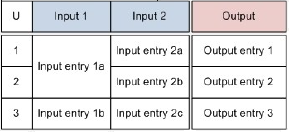
Decision logic - can define the specific logic used to make individual decisions, for example as business rules or decision tables.

DMN - the third perspective⌘
DMN will provide a third perspective (Decision Requirements Diagram):
- Business process models will define tasks within business processes where decision-making is required to occur
- Decision Requirements Diagrams will define the decisions to be made in those tasks, their interrelationships, and their requirements for decision logic
- Decision logic will define the required decisions in sufficient detail to allow validation and/or automation.
Two levels of modeling decisions⌘

Decision Model and Notation Beta 1, Figure 1: Aspects of modeling
Decision requirements level⌘
- The decision requirements level of a decision model in DMN consists of a Decision Requirements Graph (DRG) depicted in one or more Decision Requirements Diagrams (DRDs).
- A DRG models a domain of decision-making, showing the most important elements involved in it and the dependencies between them.
- The elements modeled are decisions, areas of business knowledge, sources of business knowledge, and input data
Decision⌘

- A decision is the act of determining an output value (the chosen option), from a number of input values, using logic defining how the output is determined from the inputs.
- This decision logic may include one or more business knowledge models.
Business Knowledge Model⌘

- Business Knowledge Model denotes a function encapsulating business knowledge, e.g., as business rules, a decision table, or an analytic model.
Knowledge source⌘

- A knowledge source denotes an authority for a business knowledge model or decision.
- Examples: policies, regulations, best practices, human expertise and analytic insight, domain experts responsible for defining or maintaining them, or source documents from which business knowledge models are derived, or sets of test cases with which the decisions must be consistent
Input Data⌘

- An input data element denotes information used as an input by one or more decisions.
Requirements⌘

- A decision is said to “require” its inputs in order to determine its output.
- The inputs may be input data, or the outputs of other decisions.
- Decisions may be connected in a network called a Decision Requirements Graph (DRG), which may be drawn as a Decision Requirements Diagram (DRD).
Requirement Types⌘
Three types of requirements:
|
|
|
|
|
|


Information Requirement⌘

- Information Requirement may be drawn from Input Data elements to Decisions, and from Decisions to other Decisions.
- They represent the dependency of a Decision on information from input data or the results of other Decisions.
- Information Requirement may be interpreted as data flow.
- The arrow is drawn in the direction of information flow, i.e., towards the Decision that requires the information.
Knowledge Requirement⌘

- Knowledge Requirements may be drawn from Business Knowledge Models to Decisions, and from Business Knowledge Models to other Business Knowledge Models.
- They represent the invocation of business knowledge when making a decision.
- They may be interpreted as function calls.
- The arrows are drawn in the direction of the information flow of the result of evaluating the function, i.e. toward the element that requires the business knowledge.
Authority Requirement⌘
Authority Requirements may be used in two ways:

from Knowledge Sources to Decisions, Business Knowledge Models and other Knowledge Sources, where they represent the dependence of the DRD element on the knowledge source.

from Input Data and Decisions to Knowledge Sources, where they represent the derivation of Business Knowledge Models from instances of Input Data and Decision results, using analytics.
Connection rules⌘

Decision logic level⌘

Decision logic level⌘
- Decision requirements level is often sufficient for business analysis of a domain of decision-making.
- Using decision logic, the same components may be specified in greater detail, to capture a complete set of business rules and calculations, and to allow the decision-making to be fully automated.
- At the decision logic level, every decision in a DRG is defined using a value expression which specifies how the decision’s output is determined from its inputs.
- The value expression may be notated using a boxed expression.
Decision Logic⌘
- The logic used to make decisions, defined in DMN as the value expressions of decisions and business knowledge models and represented visually as boxed expressions.
- Decision logic can be represented as:
- a literal expression represents decision logic as text that describes how an output value is derived from its input values. The expression language may be formal or executable: a plain English description of the logic of a decision, a first order logic theory, a Java or a PMML document, an expression language: FEEL
- a decision table is a tabular representation of decision logic.
- an invocation is a tabular representation of how decision logic that is represented by a business knowledge model is invoked by a decision, or by another business knowledge model. An invocation may also be represented as a literal expression, but usually the tabular representation will be more understandable.
FEEL Expression Language⌘
FEEL stands for Friendly Enough Expression Language and it has the following features:
- Side-effect free
- Simple data model with numbers, dates, strings, lists, and contexts
- Simple syntax designed for a wide audience
- Three-valued logic (true, false, null) based on SQL and PMML
FEEL Example⌘

Boxed Expression⌘

- Boxed Expression is a graphical notation for decision logic.
- This notation serves to decompose the decision logic model into small pieces that can be associated with DRG artifacts.
- Boxed expressions are defined recursively, i.e. boxed expressions can contain other boxed expressions.
- The top-level boxed expression corresponds to the decision logic of a single DRG artifact.
Boxed literal expression⌘

- In a boxed expression, a literal expression is represented by its text.
Boxed invocation⌘

- An invocation is a container for the parameter bindings that provide the context for the evaluation of the body of a business knowledge model.
Decision Table⌘
- A decision table is a tabular representation of a set of related input and output expressions, organized into rules indicating which output entry applies to a specific set of input entries.

- IF input expression 1 matches x AND input expression 2 matches y THEN a result (a "hit") is z.

- If Customer = “Business” and OrderSize < 10 then Discount = 0.10
Decision Table Orientation⌘
Depending on size, a decision table can be presented horizontally (rules as rows), vertically (rules as columns), or crosstab (rules composed from two input dimensions).
Rules as rows⌘


Rules as columns⌘


Rules as crosstab⌘

DRD Example⌘
To identify and document decisions we should identify a number of elements:
- Input Data requirements
- Knowledge about the Decision
- Related Decisions
This example is based on Decision Management Solutions, Decision Modeling with DMN, White Paper
Input Data⌘

- information sources that are required as Input Data should be identified
- input data is information from outside the decision-making context about customers, parts, orders etc.
- Input data is generally described at the level of business concepts or business objects (a customer record, or external data sources such as a credit report)
- It is also useful to specify:
- Is the information internal or external to the organization?
- Is it structured, unstructured or semi-structured data?
- How complex is the data and where can more information about it be found?
Knowledge About The Decision⌘

- Knowledge sources act as authorities for decisions.
- Decisions are driven by policies, regulations, best practices, human expertise and analytic insight.
Consider
- What tells me what I must do?
- What tells me what I should do?
- What tells me what I can do?
- What tells me what I will probably do?
- What would help me do it better?
Decision Requirements Diagram⌘
Decisions, Input Data and Knowledge Sources should be combined into a Decision Requirements Diagram. Elements can now be linked in two distinct ways:
- Information Requirements
Any Decision can have Information Requirements. If a decision requires input data or if it is dependent on information produced by another decision, for example a pre-cursor or sub-decision, then it is said to have an Information Requirement to that Decision or Input Data. Use a solid line with an arrow head pointing from the Input Data or Decision to the Decision that has the requirement. - Authority Requirements
Knowledge Sources represent authorities for decision-making. Each Decision should be linked to the Knowledge Sources that act as an authority for that Decision. If the knowledge explains how the decision should or must be made, for example a policy or regulation, or how it might be made more accurately or effectively, for example a best practice or analytic, then it is an authority for the decision. Use a dashed line with a round head to show Authority Requirements, with the round head at the Decision and the blunt end at the authority.
A High Level Decision Requirements Diagram⌘

Related Decisions in a Decision Requirements
Diagram⌘

In DMN all Information Requirements are equal—there is no way to show that some decisions are always required while others are only sometimes required.
BPMN Tasks and DMN Decisions⌘
BPMN Tasks and DMN Decisions⌘
- Most BPMN diagrams contain some tasks which involve decision-making (produce decision outputs which are used later in the process) which can be modeled in DMN.
- Decision outputs may be used in two principal ways:
- They may be consumed in another process task
- They may influence the choice of sequence flows out of a gateway.
Linking BPMN and DMN Models⌘
DMN offers two approaches to linking business process models in BPMN with decision models in DMN:
- Associating Decisions with Tasks and Processes
- Each decision may be associated with one or more business processes, and/or with one or more specific tasks.
- The process context for an instance of Decision is defined by its association with any number of usingProcesses and any number of usingTasks, which are instances of Task
- Decision Services
- A decision service encapsulates a number of decisions and exposes them as a service, which might be consumed e.g. by a task in a BPMN process model.
DRD Notation⌘
Decision Model and Notation Beta 1, Table 1: DRD components

Module 3. Questions⌘
- What is Decision according to DMN?
- What is Input Data, Business Knowledge Model, Knowledge Source?
- What is Requirement? What kinds of requirements are there?
- What is boxed expression?
- What is decision table? What types of decision tables are there?
- What is FEEL?
- How BPMN and DMN can be linked?
- How decision outputs may be used in BPMN processes?


